ModsCode / Gallery / Designs / Treemap
Treemap
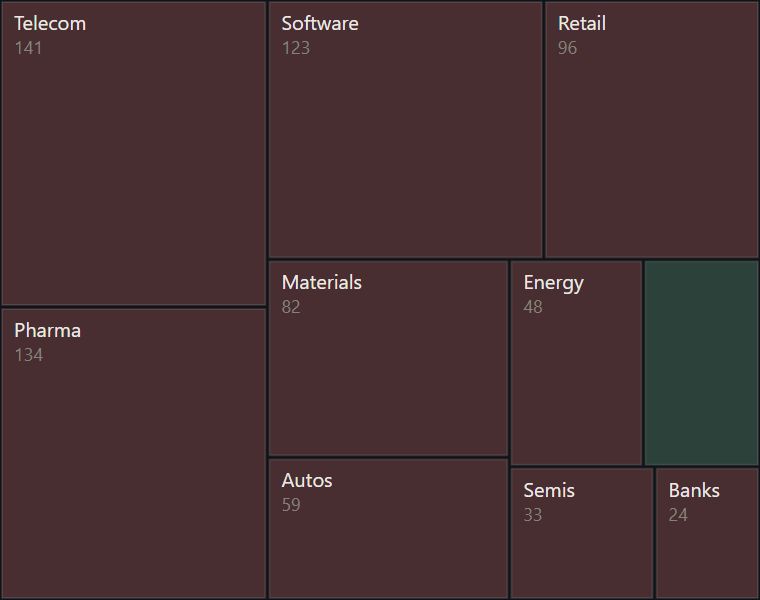
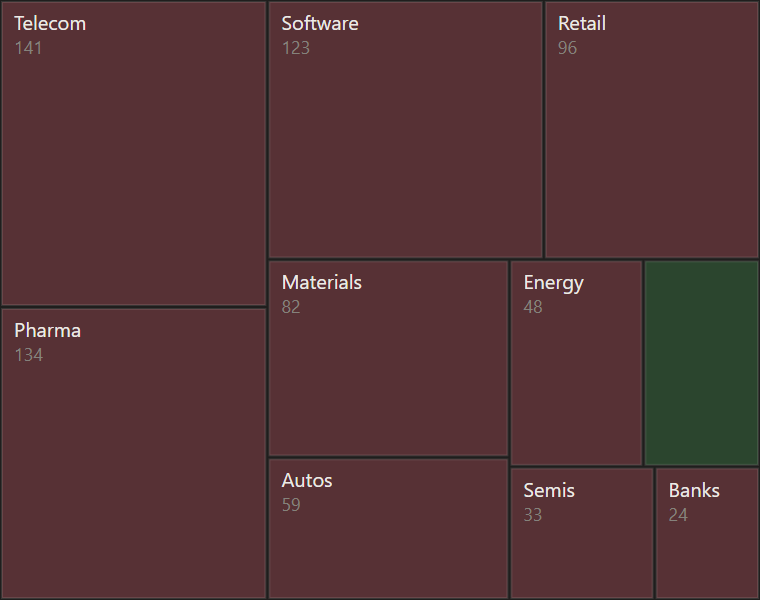
Ten sectors laid out by the squarified method across the whole pane, sized by value and tinted by the sign of change.
hooks/designs/treemap.mjs
// treemap: ten sample sectors in candle's look, laid out across the whole 380x300 pane by the squarified
// method so the cells stay close to square. Size is the value; fill is up or down at 25% by the sign of the
// change. Each cell is inset 1px, which leaves 2px gutters. A label appears only when its cell is big
// enough for it, since a clipped name reads worse than none. Sample data only.
const W = 380
const H = 300
const UP = '#2C7A39'
const DOWN = '#AB2B3F'
const INK = '#141413'
const MUTED = '#73726C'
const STAGE = '#FAF9F5'
const FONT = "'Inter Tight','Segoe UI',system-ui,sans-serif"
const NAMES = ['Software', 'Semis', 'Banks', 'Energy', 'Pharma', 'Retail', 'Autos', 'Utilities', 'Telecom', 'Materials']

// A seeded set of sizes and signs: the same picture every time. A product of two draws gives many
// small sectors and a few large ones, which is closer to a real sector spread than a flat range.
function sample() {
  let seed = 20261009
  const rnd = () => (seed = (Math.imul(seed, 1103515245) + 12345) & 0x7fffffff) / 0x7fffffff
  return NAMES.map(name => ({ name, value: 20 + 180 * rnd() * rnd(), up: rnd() < 0.55 }))
}

// Worst aspect ratio of a strip laid along a side of length `side`
function worst(row, side) {
  const sum = row.reduce((s, r) => s + r.area, 0)
  const max = Math.max(...row.map(r => r.area))
  const min = Math.min(...row.map(r => r.area))
  return Math.max((side * side * max) / (sum * sum), (sum * sum) / (side * side * min))
}

// Squarified layout: keep adding to a strip while its worst ratio improves, then cut the strip along
// the shorter side. Items must already be sorted largest first.
function squarify(items, x, y, w, h) {
  const out = []
  let rest = items
  while (rest.length) {
    const side = Math.min(w, h)
    let n = 1
    while (n < rest.length && worst(rest.slice(0, n + 1), side) <= worst(rest.slice(0, n), side)) n++
    const row = rest.slice(0, n)
    rest = rest.slice(n)
    const sum = row.reduce((s, r) => s + r.area, 0)
    if (w >= h) {
      // The strip is a column on the left
      const cw = sum / h
      let cy = y
      for (const r of row) {
        const rh = r.area / cw
        out.push({ ...r, x, y: cy, w: cw, h: rh })
        cy += rh
      }
      x += cw
      w -= cw
    } else {
      // The strip is a row along the top
      const rh = sum / w
      let cx = x
      for (const r of row) {
        const cw = r.area / rh
        out.push({ ...r, x: cx, y, w: cw, h: rh })
        cx += cw
      }
      y += rh
      h -= rh
    }
  }
  return out
}

const f = n => n.toFixed(1)
const text = (x, y, s, size, fill) =>
  `<text x="${f(x)}" y="${f(y)}" font-size="${size}" font-family="${FONT}" fill="${fill}">${s}</text>`

function treemapSource(items) {
  const total = items.reduce((s, it) => s + it.value, 0)
  const scale = (W * H) / total
  const sorted = items.slice().sort((a, b) => b.value - a.value).map(it => ({ ...it, area: it.value * scale }))
  const parts = [`<rect width="${W}" height="${H}" rx="4" fill="${STAGE}"/>`]
  for (const c of squarify(sorted, 0, 0, W, H)) {
    const left = c.x + 1
    const top = c.y + 1
    const cw = c.w - 2
    const ch = c.h - 2
    parts.push(`<rect x="${f(left)}" y="${f(top)}" width="${f(cw)}" height="${f(ch)}" fill="${c.up ? UP : DOWN}" fill-opacity="0.25" stroke="${INK}" stroke-opacity="0.12" stroke-width="1"/>`)
    // About 5.6px a character at 10px; the value line needs the taller cells
    if (cw >= c.name.length * 5.6 + 8 && ch >= 16) {
      parts.push(text(left + 6, top + 14, c.name, 10, INK))
      if (ch >= 32) parts.push(text(left + 6, top + 26, String(Math.round(c.value)), 9, MUTED))
    }
  }
  return `<svg xmlns="http://www.w3.org/2000/svg" viewBox="0 0 ${W} ${H}" width="${W}" height="${H}">${parts.join('')}</svg>`
}

const SOURCE = treemapSource(sample())

export default {
  id: 'treemap',
  title: 'Treemap',
  category: 'parts',
  description: 'Ten sectors laid out by the squarified method across the whole pane, sized by value and tinted by the sign of change.',
  element: ui => ui.Svg({ source: SOURCE, alt: 'Treemap of ten sample sectors: size is value, fill is up or down', width: W, height: H }),
}
To use it in a mod: copy the file to your mod's hooks/designs/ and return its element(ui) from a pane's ui.render. How a pane is built.
Code: PolyForm Noncommercial License 1.0.0: noncommercial use only. Required Notice: Copyright 2026 Haruki Nakada (https://modscode.com).