ModsCode / Gallery / Designs / Gantt chart
Gantt chart
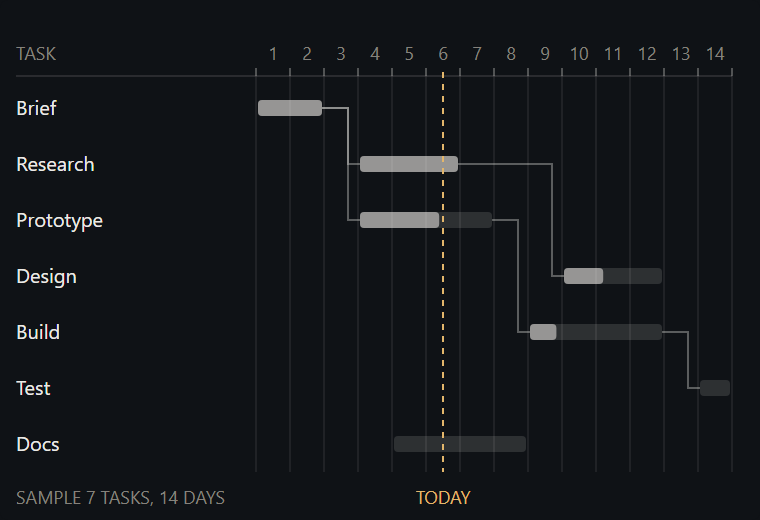
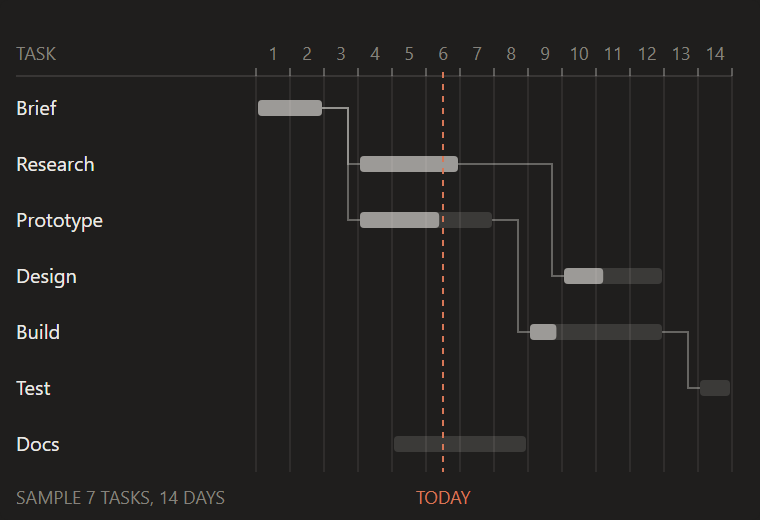
Seven tasks over 14 days with done parts, finish-to-start links that never cross a bar, and a today line.
hooks/designs/gantt.mjs
// gantt: a seven-task plan over 14 days in candle's look. Bars are 8px with a 2px corner; the done part
// is ink at 55% over a faint track. Each finish-to-start link is a 1px elbow at 35% ink that bends 6px
// before its target, and a successor always starts at least one free day after its predecessor ends, so
// no vertical leg runs through another bar. Sample plan only.
const W = 380
const H = 260
const X0 = 128 // the left edge of day 1; the task names sit in the column before it
const DAY = 17
const ROW0 = 40
const ROW = 28
const TODAY = 6
const INK = '#141413'
const MUTED = '#73726C'
const CLAUDE = '#D77757'
const STAGE = '#FAF9F5'
const FONT = "'Inter Tight','Segoe UI',system-ui,sans-serif"

// Days are 1-based and inclusive. "after" is the row (index) of the task that must finish first.
const TASKS = [
  { name: 'Brief', start: 1, end: 2, done: 1 },
  { name: 'Research', start: 4, end: 6, done: 1, after: 0 },
  { name: 'Prototype', start: 4, end: 7, done: 0.6, after: 0 },
  { name: 'Design', start: 10, end: 12, done: 0.4, after: 1 },
  { name: 'Build', start: 9, end: 12, done: 0.2, after: 2 },
  { name: 'Test', start: 14, end: 14, done: 0, after: 4 },
  { name: 'Docs', start: 5, end: 8, done: 0 },
]

const dayX = d => X0 + (d - 1) * DAY // the left edge of day d
const midY = i => ROW0 + i * ROW + ROW / 2 // the centre line of row i
const f = n => n.toFixed(1)
const text = (x, y, s, anchor, size, fill) =>
  `<text x="${f(x)}" y="${f(y)}" text-anchor="${anchor}" font-size="${size}" font-family="${FONT}" fill="${fill}">${s}</text>`
const bar = (x, y, w, opacity) =>
  `<rect x="${f(x)}" y="${f(y)}" width="${f(w)}" height="8" rx="2" fill="${INK}" fill-opacity="${opacity}"/>`

function ganttSource() {
  const parts = [`<rect width="${W}" height="${H}" rx="4" fill="${STAGE}"/>`]
  // Header: day numbers, with a brighter tick at each day edge and a faint column line below it
  parts.push(text(8, 30, 'TASK', 'start', 9, MUTED))
  for (let d = 1; d <= 14; d++) parts.push(text(dayX(d) + DAY / 2, 30, String(d), 'middle', 9, MUTED))
  for (let d = 1; d <= 15; d++) {
    const x = dayX(d)
    parts.push(`<line x1="${x}" y1="34" x2="${x}" y2="38" stroke="${INK}" stroke-opacity="0.3" stroke-width="1"/>`)
    parts.push(`<line x1="${x}" y1="38" x2="${x}" y2="236" stroke="${INK}" stroke-opacity="0.08" stroke-width="1"/>`)
  }
  parts.push(`<line x1="8" y1="38" x2="366" y2="38" stroke="${INK}" stroke-opacity="0.12" stroke-width="1"/>`)
  // Links first, so the bars sit on top of them
  TASKS.forEach((t, i) => {
    if (t.after === undefined) return
    const x1 = dayX(TASKS[t.after].end + 1) - 1 // the right edge of the earlier task
    const x2 = dayX(t.start) + 1 // the left edge of this one
    const bend = x2 - 6
    parts.push(`<path d="M${x1} ${midY(t.after)} H${bend} V${midY(i)} H${x2}" fill="none" stroke="${INK}" stroke-opacity="0.35" stroke-width="1"/>`)
  })
  TASKS.forEach((t, i) => {
    const x = dayX(t.start) + 1
    const w = (t.end - t.start + 1) * DAY - 2
    const y = midY(i) - 4
    parts.push(bar(x, y, w, 0.14))
    if (t.done > 0) parts.push(bar(x, y, w * t.done, 0.55))
    parts.push(text(8, midY(i) + 3.5, t.name, 'start', 10, INK))
  })
  // The today line runs over the bars so it stays visible where it crosses them
  const tx = dayX(TODAY) + DAY / 2 // the middle of day 6
  parts.push(`<line x1="${f(tx)}" y1="36" x2="${f(tx)}" y2="236" stroke="${CLAUDE}" stroke-width="1" stroke-dasharray="3 3"/>`)
  parts.push(text(tx, 252, 'TODAY', 'middle', 9, CLAUDE))
  parts.push(text(8, 252, 'SAMPLE 7 TASKS, 14 DAYS', 'start', 9, MUTED))
  return `<svg xmlns="http://www.w3.org/2000/svg" viewBox="0 0 ${W} ${H}" width="${W}" height="${H}">${parts.join('')}</svg>`
}

const SOURCE = ganttSource()

export default {
  id: 'gantt',
  title: 'Gantt chart',
  category: 'work',
  description: 'Seven tasks over 14 days with done parts, finish-to-start links that never cross a bar, and a today line.',
  element: ui => ui.Svg({ source: SOURCE, alt: 'Gantt timeline of seven sample tasks over 14 days with a today line', width: W, height: H }),
}
To use it in a mod: copy the file to your mod's hooks/designs/ and return its element(ui) from a pane's ui.render. How a pane is built.
Code: PolyForm Noncommercial License 1.0.0: noncommercial use only. Required Notice: Copyright 2026 Haruki Nakada (https://modscode.com).